
Docker Secrets: Enhancing the security of projects.
Safeguarding sensitive information like database credentials, API keys, or access tokens is like paramount importance.

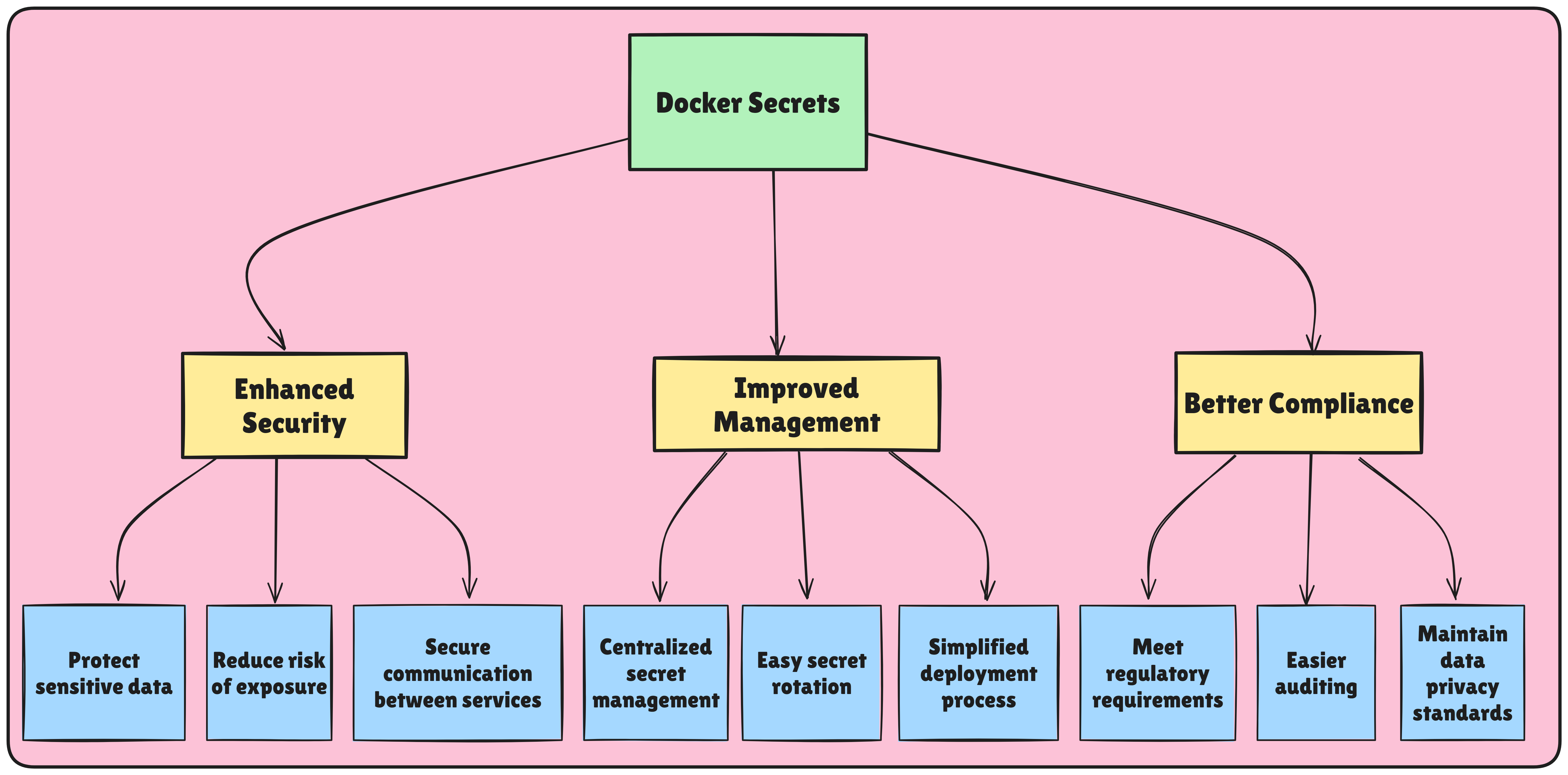
In containerized applications, managing sensitive information such as passwords, API keys, and database credentials is crucial. Storing these details directly in code or environment variables can lead to significant security risks. Docker Secrets offers a robust way to handle sensitive data securely, allowing you to enhance the security of your projects without compromising functionality.
What is Docker Secrets?
Docker Secrets is a feature designed for securely managing sensitive information within Docker containers. It’s especially useful for applications running in Docker Swarm mode, where secrets are encrypted and managed across multiple services and nodes in a cluster. By using Docker Secrets, you ensure that sensitive data is kept away from your codebase and is only available to authorized services within the container environment.
Imagine a scenario where you directly embed database credentials within your application code. While it might seem convenient, this approach creates a security breach:
👉Exposure in Code:
Sensitive data becomes visible to anyone with access to the codebase, posing a security risk in case of leaks or accidental commits.
👉Version Control Woes:
Version control systems like Git track all changes, including potentially leaked secrets within past commits.
👉Hardcoded Configurations:
Changes to credentials require modifying the code and rebuilding the image, introducing inefficiencies.
Docker Secrets provide a secure alternative by decoupling sensitive information from your container images.
Here's how they work:
👉Secret Storage: Store your secrets in a separate Docker Secret object, accessible only by the Docker daemon. This eliminates the need to embed them directly in your container images.
👉Environment Variable Injection: During container runtime, Docker injects the values from your secrets as environment variables into your containers. These EV can be accessed easily then.
👉Swarm-Specific Feature: DS are currently only available within Docker Swarm mode, not in standalone Docker deployments. Standalone deployments can leverage environment variables from the host machine or explore alternative secret management solutions like HashiCorp Vault.
📌Real-World Example: Securing Database Credentials
Let's see how to use Docker Secrets to secure database credentials for a Node.js application:
1. Create a Docker Secret:
This command creates a Docker Secret named db-password with the value stored securely within the Docker daemon (replace your_database_password with your actual password).

2. Access the Secret in Your Application:
Within your Node.js application, you can access the secret value using the standard process.env object:
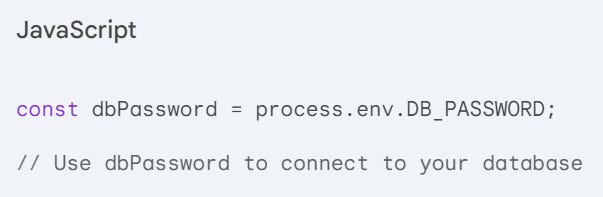
3. Define Service Access in Docker Compose (Swarm Mode):
In your Docker Compose configuration file (assuming Swarm mode), specify which services have access to the secret:
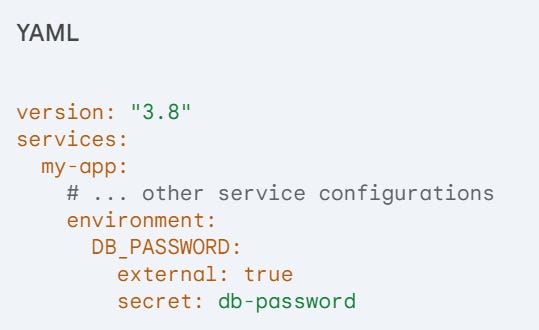
This configuration grants the my-app service access to the db-password secret, allowing it to retrieve the password value as an environment variable at runtime.
By incorporating Docker Secrets into your DevOps workflow, you achieve:
👉Enhanced Security:
Sensitive data is decoupled from your container images, minimizing the attack surface and potential exposure.
👉Improved Code Management:
Your codebase remains clean and free of sensitive information, simplifying version control and collaboration.
👉Flexible Credential Management:
Easily update credentials without rebuilding container images, promoting agility and efficiency.
While Docker Secrets offer a convenient solution within Docker Swarm environments, alternative tools cater to broader needs:
👉HashiCorp Vault:
A popular, open-source secrets management tool offering centralized storage, access control, and encryption for various secrets.
👉AWS Secrets Manager or Azure Key Vault:
Cloud-based solutions for managing secrets within their respective cloud platforms. Docker Secrets empower you to safeguard sensitive data within your DevOps projects.
Best Practices for Using Docker Secrets
Restrict Access: Only allow services that absolutely need access to a secret to use it.
Rotate Secrets Regularly: Update secrets periodically to reduce the risk of compromise.
Use Secrets with Swarm Mode: Docker Secrets are built specifically for Swarm mode, providing better security management for cluster-based applications.
Avoid Logging Secrets: Ensure that logs do not contain sensitive information from Docker Secrets to avoid accidental exposure.
Conclusion
Docker Secrets provides a secure, efficient way to manage sensitive data in your dockerized applications. By using Docker Secrets, you enhance the security of your projects, ensuring that sensitive information is properly managed, encrypted, and only accessible to authorized services. For modern applications, especially those in production, Docker Secrets is an essential tool for secure and scalable container management.