
Deep Dive: Understanding IP Addresses and Port Numbers in Network Communication.
In networking, IP addresses and port numbers play a core role in ensuring services can communicate adequately and without interruption.

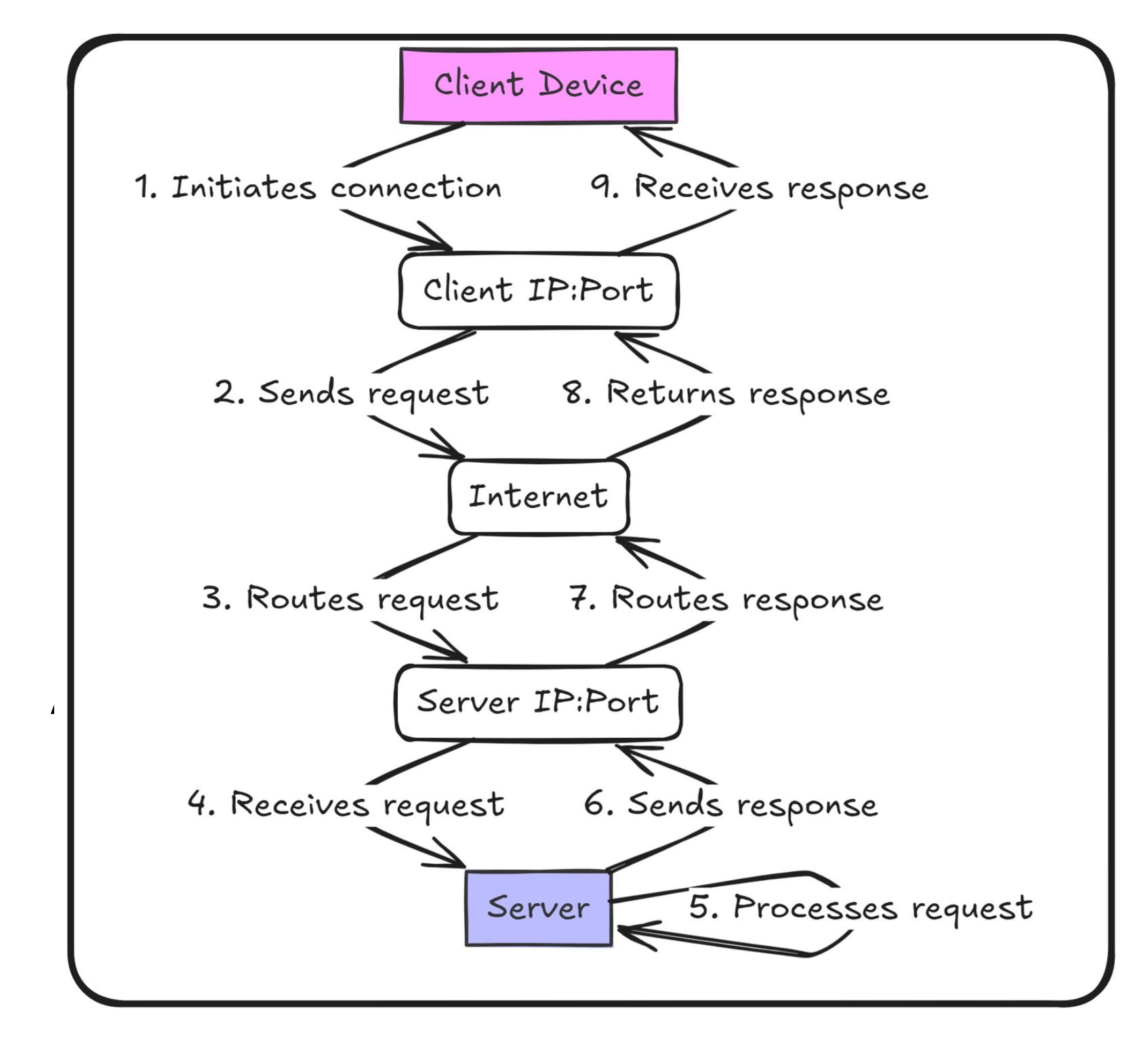
IP addresses and port numbers work together to be the foundation of how data is exchanged-the network traffic destined for the right destination and service. So let's dive into this concept with some actual real-world scenarios and examples.
What Are IP Addresses and Port Numbers?
An IP address is, therefore, an identification assigned to a device in a network, similar to a house address. It helps locate the device in the vast expanse of the internet or a private network.
A port number is a specific service or application running on a device. It's somewhat like the apartment number inside a building that allows you to reach the right resident.
Example:
A database service like MySQL typically listens on port 3306, while a web server like Nginx runs on port 80 for HTTP traffic.
How They Work Together
When services communicate over a network, they use the combination of an IP address and port number to ensure the data reaches the intended recipient and service.
Scenario: Tomcat Communicating with MySQL
Tomcat (Web Application): Running on Server A, with IP address
192.168.1.10.MySQL (Database):
Running on Server B, with IP address192.168.1.20, and LISTENING on port 3306.
When Tomcat wants to write the data or needs to read the data, it sends a request to:
IP Address:
192.168.1.20- Server BPort Number:
3306- MySQL service
This makes sure that the data packet is transmitted to the right machine and the right service.
Why Are IP Addresses and Port Numbers Important?
1. Why Can a Single Server Host Multiple Services?
A single server can host many services and each is identified by a port number:
Nginx (Web Server): Port 80
Tomcat (Application Server): Port 8080
MySQL (Database): Port 3306
These services can coexist without conflict, even on the same IP address, by the use of port numbers.
2. Routing Traffic Across Networks
Routers and firewalls direct data packets to the proper destination based on IP address and port number. For instance: traffic destined for 192.168.1.20:3306 is delivered to MySQL. traffic destined for 192.168.1.20:8080 is delivered to Tomcat.
Real-World Use Cases
Example: Distributed Microservices Architecture
In a multi-service project where services are coupled together through the Internet, using an IP address along with a port number makes sure communication is carried out effectively:
Nginx (HTTP Requests): Port 80
Tomcat (Business Logic): Port 8080
RabbitMQ (Message Broker): Port 5672
MySQL (Database): Port 3306
Memcached (Caching): Port 11211
When Tomcat (IP 192.168.1.10) sends a database query to MySQL (IP 192.168.1.20), it will target port 3306, ensuring that the request is served by the database service.
Firewalls and Security Groups
Firewalls and security groups add another layer of protection because their filters allow traffic based on:
Source IP Address: Who can send the data.
Destination Port Number: Which service can receive the data.
Example: Restricting Access to MySQL
Allow traffic only from Tomcat's IP (
192.168.1.10) to reach MySQL (192.168.1.20) on port 3306.Block all other traffic to MySQL, thus preventing unauthorized services or users from accessing the database.
This configuration strengthens security but only allows approved services to communicate.
Key Components in Action
IP Address
Allows identification of a specific machine in a network.
Example:
192.168.1.20is the address for a database server.
Port Number
Distinguishes services running on the same machine.
Example: Port 3306 is used for MySQL, while port 8080 is for Tomcat.
IP + Port Combination
Ensures accurate routing of traffic to the desired service.
Example:
192.168.1.20:3306directs traffic to MySQL on the database server.
Visualizing Network Traffic Flow
Tomcat Sends Data to MySQL Source:
192.168.1.10:8080(Tomcat) Destination:192.168.1.20:3306(MySQL)Firewall Checks: Allows incoming traffic from the IP and port of Tomcat to reach the IP and port of MySQL Denies unauthorized incoming traffic, providing much security.
MySQL Receives Request: To listen on the port 3306. Processes the request and sends a response back to Tomcat.
Example in Real Life: Scalable Web Applications
An e-commerce platform could be taken as an example below: Nginx listens to HTTP requests on port 80. Tomcat is processing the orders and runs on port 8080. MySQL stores customer data on port 3306. CloudFront delivers static content globally.
ELB (Elastic Load Balancer): Spreads traffic to several servers.
During sales, traffic peaks: - ELB distributes the load across many instances of Nginx and Tomcat. - With IP and port combinations, the requests are made sure to hit the right services.
Best Practices on Managing IP Addresses and Ports
Plan Service Assignments: - Give different services to use distinct ports, not conflict at all.
Firewalls: Use IP and port filters to limit access to sensitive services.
Network Traffic Monitoring: Use resources that spot unauthorized access or peculiar traffic patterns.
Secure Communication: Encrypting sensitive data traveling between services.
Key Takeaways
IP Addresses are used to identify devices in a network.
Port Numbers differentiate services operating on the computers. - Utilizing IP + Port means that there is proper routing of traffic. - Firewalls and security groups improve security through access control.
Mastering IP addresses as well as port numbers is the best way network engineers can easily facilitate communication, solidify security, and deliver services in appropriate systems. Whether managing one server or a global network, these are some of the essentials needed.